AI for accountants works best on the boring, high-volume jobs around the advice: chasing documents, reminding clients about deadlines, getting receipts and bills into Xero or MYOB, sorting the inbox and drafting routine letters for you to check. Australian practices should start there, keep a qualified person reviewing anything that goes to a client or the ATO, and keep client data out of public AI chatbots.
I'm Sanket, founder of Digital Sauce in Melbourne. We design and build apps, and connecting them to the accounting tools our clients already use, Xero and MYOB especially, is part of most projects. That's where our workflow automation work comes from. This guide is for partners and practice managers at small Australian firms who keep hearing about AI and want to know what's actually worth doing on a Monday morning.
How are Australian accountants using AI today?
Mostly in three ways: AI that's already built into the software they use, general AI chat tools for drafting and summarising, and automations that move documents and data between systems. The third one usually saves the most time, and much of it isn't really AI at all.
- Built into the software. The big accounting platforms are adding AI features. Xero, for example, markets JAX as an AI finance partner for keeping the books current. If you already pay for a platform, check what its AI features do before buying anything new.
- Chat tools for drafting. Staff use AI chat tools to draft emails, summarise long documents and explain unfamiliar rules. That's useful, but it's also where client data leaks most easily. More on that below.
- Automations. Rules that run on their own: when a client uploads a document, file it and tick it off; when a return is ready, send the sign-off request; when a reminder date arrives, email the clients who haven't sent their records. AI helps at a few points, like reading a receipt or sorting an email, but the workflow does the heavy lifting.
If automation is new to you, our guide to business process automation for Australian small businesses covers how to pick a first workflow. This post stays on accounting practices.
Which accounting tasks should I automate first?
Start with work that is frequent, rule-based and annoying: collecting client documents, sending reminders, and getting data into the ledger. Leave judgement calls, advice and anything lodged with the ATO to people. Here are the six I'd look at first.
Start here
What an accounting practice can automate first
Request, receive, rename and file client documents, then chase what's missing.
When a job startsPolite, scheduled nudges for records, sign-offs and upcoming due dates.
When a date gets closeReceipts and bills read and drafted into Xero or MYOB for someone to approve.
When a document arrivesEmails labelled by client and type, and routed to the right person.
When an email landsNew client details collected once and set up in every system that needs them.
When an engagement is signedFirst drafts of routine letters and summaries, always checked before sending.
When work is ready to reportHighlighted: the chasing and typing that eats most of a small practice's week.
1. Document collection and chasing
When a job starts, send the client a checklist and a secure upload link. When files arrive, rename them to your convention, file them against the client and job, and tick them off. Then send a reminder for whatever is still missing. Watch out: use an upload portal rather than email attachments, and keep a person on anything that doesn't match the checklist.
2. Client reminders
Records due, documents to sign, a meeting to book: schedule the nudges once and let them go out on their own, stopping as soon as the client responds. Watch out: the reminder is only as good as the dates behind it. Pull them from your practice management system rather than a separate spreadsheet, and have someone own the list.
3. Data entry into Xero or MYOB
AI is genuinely good at reading receipts, bills and statements and pulling out the supplier, date, amount and GST. Have it create a draft transaction for a person to approve, not post it straight to the ledger. Watch out: check the extracted numbers against the source on a sample every week, especially early on. Reading errors are rare but confident.
4. Inbox triage
A shared inbox can be sorted automatically: match the sender to a client, label the email by type (documents, question, ATO correspondence, invoice) and assign it to the right person. Watch out: sorting is fine, but don't let an automation send replies on technical questions. A wrong answer in your name is worse than a slow one.
5. Client onboarding
Collect a new client's details once, through one form, then create them in your practice management system, accounting software and document storage, with the engagement letter ready to sign. Watch out: keep your identity checks and engagement steps exactly as they are now. The automation should carry out your process, not skip parts of it.
6. Drafting letters and summaries for review
AI can produce a decent first draft of a routine cover letter, a meeting summary or a plain-English explanation of a report. A person then checks and edits it before it goes out. Watch out: use a business AI product with settings you control, never a public chatbot, for anything containing client information. The next section explains why.
Example flow
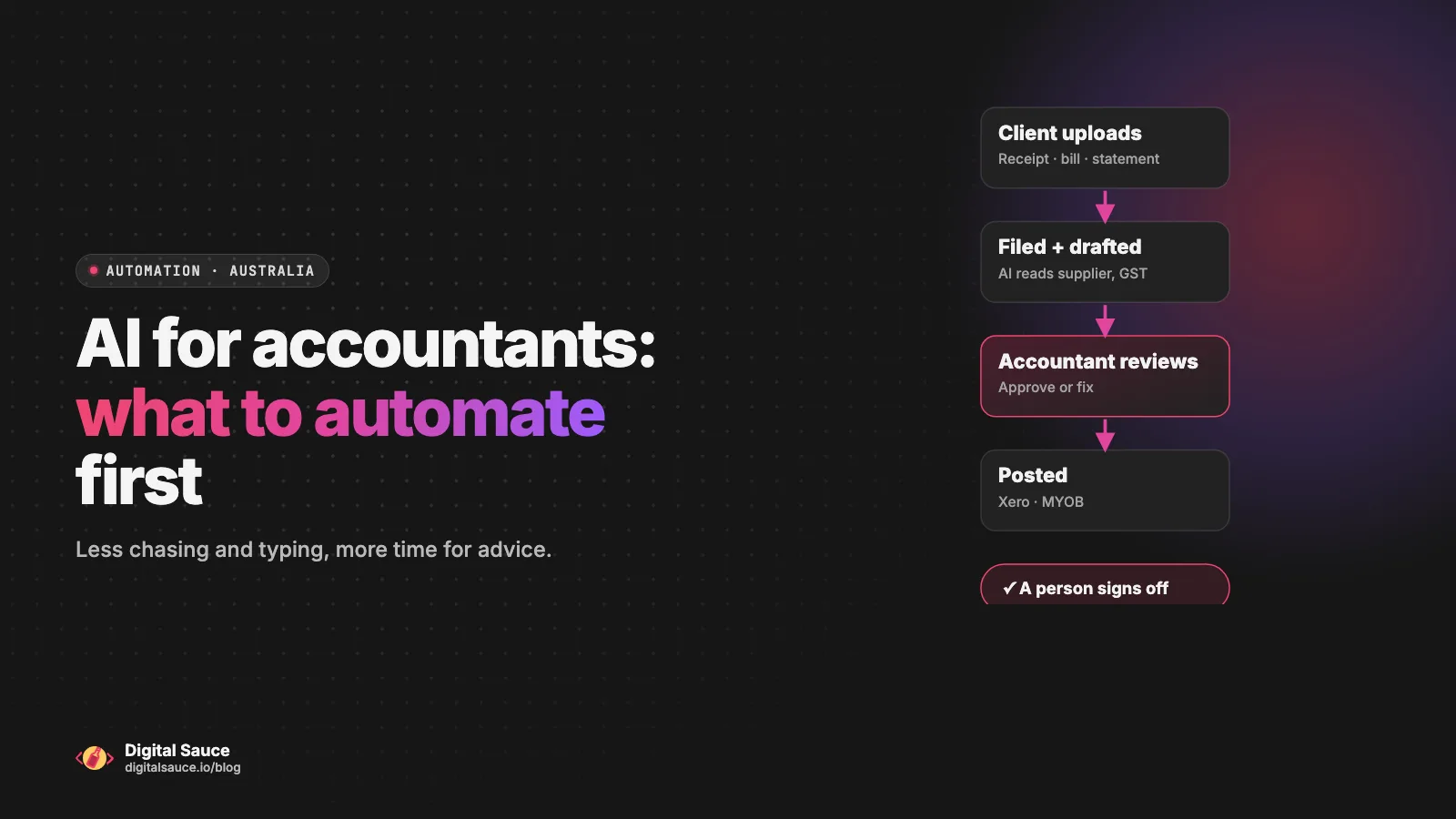
A receipt, from upload to ledger, with a human check
Through a portal, not an email attachment
Renamed to the client and job; AI drafts supplier, date, amount and GST
Approves the draft or fixes it
Into Xero or MYOB, with the source document attached
What to leave alone for now: tax positions, advice, anything you sign or lodge, and conversations with upset clients. AI can help you prepare for those, but a qualified person should do them.
Which tools connect to Xero and MYOB?
Xero is well supported: Zapier, Make and n8n all have ready-made Xero connectors. MYOB and Xero Practice Manager take more work, usually through their APIs with an HTTP step or custom code. Here's how it looked when I checked each vendor's documentation in November 2026.
| Tool | Xero | MYOB and Xero Practice Manager | Good fit for |
|---|---|---|---|
| Zapier | Ready-made app, labelled Premium | Zapier lists MYOB as not yet supported, and I couldn't find a Xero Practice Manager app | Quick, simple connections between popular apps |
| Make | Modules for contacts, invoices, bank transactions, payments and more | Through each product's API, using an HTTP module | Multi-step workflows you can see on a canvas |
| n8n | Built-in node for contacts and invoices | Through the API, using the HTTP Request node | More control, and the option to host it yourself |
| Custom code | Xero's API | The MYOB Business API and the Xero Practice Manager API | Workflows the connectors can't do, or that need to scale |
Also look at the Xero App Store before building anything. If a ready-made app already does the job, such as receipt capture or document requests, it will often beat a custom automation. We use n8n, Zapier, Make and custom code depending on the job, and often a mix of them.
What about client privacy and professional obligations?
The short version: treat any AI or automation tool like any other service provider that handles client data. Know where the data goes, send only what's needed, tell clients about it, and keep a qualified person responsible for the output. Here are the rules worth knowing. This is general information, not legal advice.
- Confidentiality under the TPB Code. If you're a registered tax or BAS agent, the Tax Practitioners Board's Code of Professional Conduct says you must not disclose a client's information to a third party without their permission, unless you have a legal duty to. The TPB's confidentiality guidance treats outsourcing and cloud storage as third-party arrangements: you still have to protect confidentiality and disclose the arrangement to clients appropriately. It's sensible to treat AI services the same way.
- Reasonable care. The same Code requires you to provide services competently and take reasonable care to apply the tax laws correctly. An AI draft doesn't change who's responsible, so review it like you'd review a graduate's work.
- Keep personal information out of public AI tools. The OAIC's guidance on commercially available AI products recommends, as best practice, not entering personal information, particularly sensitive information, into publicly available AI chatbots. Use business products where you control whether your data is used for training, and check where it's stored.
- The Privacy Act. Many practices are covered by the Australian Privacy Principles. Check whether yours is, and if it is, make sure your privacy policy and engagement letters reflect the tools you use.
- Send less data. An automation only needs the fields for its job. A step that reads a receipt doesn't need the client's tax file number or their full history.
What does a first automation project look like?
A good first project is one workflow, mapped carefully, built and tested on real (or realistic) work, then run alongside your current process until you trust it. Here's how we approach one.
- A short chat. You tell us where the week goes. We pick one workflow that's frequent, painful and low risk. Document chasing is a common choice.
- Map it. We write down every step as it happens today, including the exceptions: the client who emails a photo, the job with two entities.
- Build and test. We build it with the right tool for your systems and test it on sample work before it touches a live client.
- Run it side by side. For a while, the automation runs and a person checks its output against how it would have been done by hand.
- Hand it over. You get notes on what it does, what to watch, and what to do when something odd happens.
Every project is scoped after a short chat, because the effort depends on your systems. Connecting two apps that have ready-made connectors is a very different job from working with an API.
Will AI replace accountants?
No. It replaces some of the typing and chasing. Judgement, advice, relationships and accountability stay with people, and for registered agents the obligations to act competently and with reasonable care stay with the practitioner whatever tools they use.
What changes is where the hours go. If AI and automation take care of collecting, sorting and keying in, a small practice gets that time back for advice, review and the clients who need a conversation. That's the honest pitch: not fewer accountants, but fewer evenings spent renaming PDFs.
FAQ
Is it safe to put client data into AI tools?
It depends on the tool. The OAIC recommends not entering personal information, especially sensitive information, into publicly available AI chatbots. Business AI products can be safer if you control whether your data is used for training and know where it's stored. Registered tax and BAS agents also need to keep their TPB confidentiality obligations in mind, which include telling clients about third-party arrangements.
Do I need custom software or will Zapier do?
Zapier is often enough for simple Xero workflows. As of November 2026, Zapier lists Xero as a Premium app and MYOB as not yet supported, so MYOB and Xero Practice Manager work usually needs Make or n8n with an HTTP step, or custom code against their APIs. Start with the simplest tool that does the job reliably.
Can automation work with Xero Practice Manager?
Yes. Xero publishes an API for Xero Practice Manager, so client and job information can be read and updated by an automation. When I checked in November 2026, I couldn't find a ready-made Xero Practice Manager app in Zapier, so expect an HTTP step in Make or n8n, or some custom code.
How long does a small automation take to set up?
It depends on the workflow and your systems. Connecting two apps that have ready-made connectors is quick. A workflow that touches several systems, uses an API or needs AI steps takes longer to map, build and test properly. We give you a scoped estimate after a free chat.
Who looks after the automation once it's built?
Someone has to own it. We watch the first live runs, hand over notes on what it does and what to watch for, and agree up front who looks after it afterwards: your team, us, or a mix. Automations need occasional care when the tools they connect change.
Read next
- Business process automation: where to startPick one task, automate it, check it works
- CRM automation: 7 workflows worth setting upFrom lead capture to won-deal handover
- AI automation for small businessHow we map, build and hand over workflows
- Discovery & StrategyWork out what is worth building first
Sources
- Code of Professional Conduct, Tax Practitioners Board
- Confidentiality of client information, Tax Practitioners Board
- Guidance on privacy and the use of commercially available AI products, OAIC
- Australian Privacy Principles, OAIC
- JAX, your AI finance partner, Xero
- Xero App Store, Xero
- Xero Practice Manager API, Xero Developer
- MYOB API Developer Centre, MYOB
- Xero integrations, Zapier
- MYOB integrations, Zapier
- Xero app documentation, Make
- Xero node, n8n docs
Last updated 15 November 2026. Tool features, plans and integrations change, so check each vendor's current documentation before you commit. The examples here are typical workflows, not client projects. This is general information, not legal, tax or professional advice.